The tactical AI workflow automation playbook for founders past their first $1M. Real patterns, real tools, real time savings. No theoretical “AI will transform your business” content.
| Written by the PlanX team • Last updated: May 2026 • Reviewed for accuracy: May 2026
Sources cited: Gartner 2026 Predictions, OvalEdge Agentic AI Analysis 2026, industry research on AI workflow tools (May 2026) |
| QUICK ANSWER
AI workflow automation lets founders delegate entire multi-step processes to AI agents that plan, act, and self-correct with minimal supervision. The 12 highest-ROI workflows for founders in 2026 include inbox triage, meeting intelligence, lead scoring, contract generation, customer onboarding, content repurposing, and strategic decision support. Founders who deploy 4 to 6 of these properly recover 15 to 40 hours per week. The best tool stack in 2026 combines a workflow orchestrator (Make.com or n8n), an LLM (Claude, ChatGPT, or Gemini), and specific app integrations. Start with inbox triage and meeting intelligence for the fastest 30-day ROI. |
| AI Workflow Automation 2026: Key Facts
• Enterprise apps embedding AI agents by end of 2026: 40%+ (Gartner) • Enterprise workflows that will be agentic by 2028: one-third (Gartner) • Tier 1 support tickets resolved by AI without escalation: 68% (industry data) • Typical founder time recovered from 4 to 6 workflows: 15 to 40 hours/week • Sales pipeline conversion improvement from AI lead scoring: 15 to 30% • Reply rate improvement from AI-personalized outreach: 2x to 3x • Customer onboarding time reduction with AI sequencing: 40 to 60% • Employers providing no AI training: 70% (2026 research) • Businesses with unstructured data (AI readiness gap): 67% (2026 research) • Dominant workflow tools 2026: Make.com, n8n, Zapier, Relay.app |
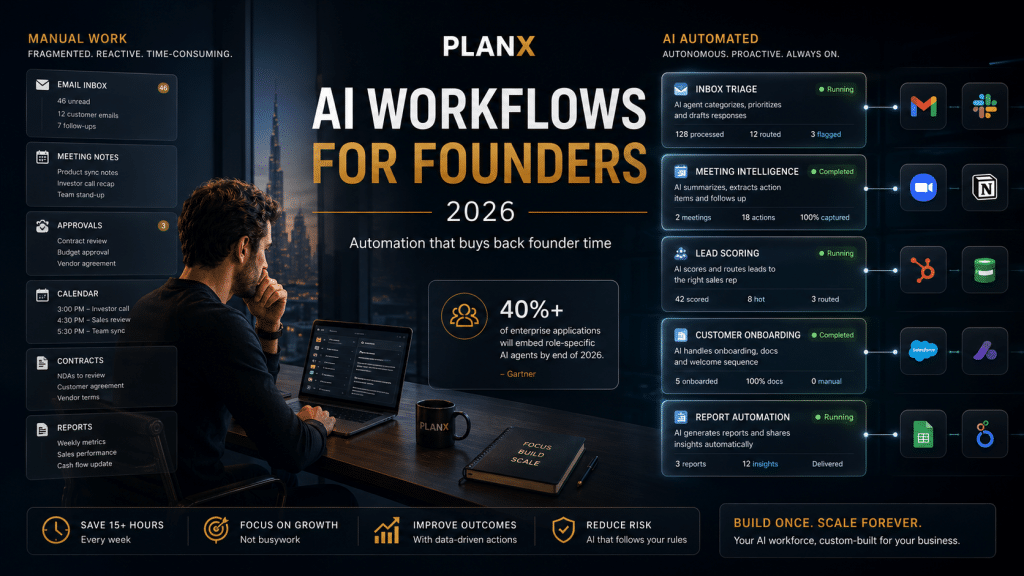 Gartner predicts 40%+ of enterprise applications will embed role-specific AI agents by end of 2026. The founders building these workflows now are setting the pace for the next 24 months.
There’s a specific moment every 7-figure founder hits. The business is growing. Revenue is climbing. And your calendar somehow gets worse every quarter, not better.
You’re approving expenses, following up on emails, reviewing contracts, sitting in meetings you don’t need to be in, generating reports nobody reads, and answering the same questions you answered last week. The business is working. You’re not. And every founder who’s been here knows the next 12 months will be even worse unless something fundamentally changes.
AI workflow automation is the thing that changes it. Not the surface-level “use ChatGPT to write emails” version of AI. The structural version: AI agents and automation patterns that handle entire workflows from trigger to outcome with minimal human input. The kind of deployment that returns 15+ hours of founder time per week and compounds across every team member you’ve already hired. This guide is part of our AI scaling pillar for 7-figure founders and goes deep on the tactical workflows that actually work in 2026.
Gartner predicts that by the end of 2026, over 40% of enterprise applications will embed role-specific AI agents. By 2028, one-third of enterprise workflows will be agentic. The founders building these workflows now are setting up the operating leverage that compounds for the next 5 years. The ones still using AI as a chat tool are falling behind every quarter.
What follows: 12 specific AI workflows that produce measurable time savings, the tools that actually work for founders (verified May 2026), the implementation order that compounds, and the mistakes that turn AI projects into shelfware.
| Which workflow should you actually automate FIRST?
Most founders waste 60 to 90 days automating the wrong workflows. The 2-minute Founder Bottleneck Quiz tells you where AI deployment will pay back fastest in your specific business. Built for founders past their first $1M. |
What changed in AI workflow automation in 2026?
The biggest shift in 2026 is the move from reactive AI copilots to autonomous AI agents. Earlier tools required you to prompt each step. 2026 agents take a goal, plan the steps, call tools, make decisions, evaluate results, and complete tasks with minimal supervision. The tool stack has also consolidated around 4 to 5 dominant platforms, and “agent washing” (vendors falsely labeling basic automation as agentic) has become a real risk to watch for.
1. The shift from reactive copilots to autonomous agents
Earlier AI tools were reactive. You typed a prompt, the AI responded, you took the next action. Workflows were a series of human-prompted steps. Useful but exhausting.
2026 agents work differently. You set a goal. The agent plans the steps. It calls tools, makes decisions, evaluates results, adjusts course, and finishes the task with minimal supervision. This is the difference between an assistant who waits to be asked and an operator who executes.
Per industry analysis from OvalEdge, agentic AI runs on an execution loop: interpret the goal, plan steps, take an action with a tool, evaluate results, continue until completion. Traditional automation required fixed rules. Agentic systems adapt to changing inputs in real time. That’s the categorical shift.
2. The tool stack has consolidated around 4 to 5 platforms
In 2023, AI workflow tools were fragmented. Dozens of point solutions, none of them complete. In 2026, the market has converged. Most founders running real AI workflows are using some combination of:
- com or n8n for visual workflow orchestration (n8n if self-hosted/open source preference, Make.com if you want managed)
- Zapier Central or Zapier Agents for cross-app automation with AI decision-making layered in
- app for simpler, founder-friendly AI workflow builds without technical setup
- Claude, ChatGPT, or Gemini as the underlying LLM doing the actual reasoning inside workflows
- Relevance AI or Gumloop for multi-agent systems that coordinate across complex tasks
You don’t need all of these. Pick one workflow orchestrator + one LLM + the specific app integrations you need. Most successful founder deployments run on 3 to 5 tools total.
3. Watch out for agent washing
As agentic AI becomes the marketing buzzword of 2026, vendors are labeling everything as agents. Chatbots, basic rule-based automation, and simple LLM API calls are all being marketed as “agentic.”
A real agent has three things: an execution loop (plans, acts, evaluates, adjusts), genuine tool use (calls APIs, queries databases, triggers workflows), and adaptive decision-making (responds to changing inputs without rule updates). If a tool just sends prompts to an LLM and returns the response, that’s not an agent. That’s a wrapper.
| How to tell if a vendor is real
Ask for three things: (1) a live demo of the agent making a decision and self-correcting when something fails, (2) a list of tools/APIs the agent can actually call (real agents have specific tool catalogs), (3) customer case studies showing the agent running unsupervised for at least 30 days. If a vendor can’t produce all three, it’s likely agent washing. |
What are the 12 best AI workflows for founders in 2026?
The 12 highest-ROI AI workflows for founders, ranked by typical hours saved per week, are: inbox triage, meeting intelligence, lead scoring, contract generation, customer onboarding, content repurposing, financial reporting, customer support, hiring pipeline, internal knowledge base, sales outreach, and strategic decision support. Each workflow below includes setup complexity, recommended 2026 tools, and realistic time savings. These are patterns we see consistently in the PlanX community across founders running $1M to $20M businesses.
Workflow #1: AI inbox triage and response drafting
| Time saved | 8 to 14 hours per week |
| Setup complexity | Medium (3 to 6 hours to build properly) |
| Best tools 2026 | Superhuman AI, Notion AI, Shortwave, custom workflows in Make.com + Claude API |
| Founder-fit | Critical for any founder with 50+ emails per day |
The pattern: AI categorizes incoming emails by urgency, intent, and required action. Drafts responses for high-frequency email types (intro requests, sales follow-ups, customer questions, partnership pitches). Surfaces only the emails that genuinely need your attention. Auto-archives or auto-responds to the rest.
Why this is #1: email is the single largest invisible time sink for 7-figure founders. Saving 8 to 14 hours per week here is equivalent to giving yourself a full day back. Compounds across team members if you scale the pattern.
Implementation note: Don’t fully automate replies on customer-facing or high-stakes emails. AI drafts, you review and send. The judgment layer stays human.
Workflow #2: Meeting intelligence and action item routing
| Time saved | 5 to 9 hours per week |
| Setup complexity | Low (1 to 2 hours) |
| Best tools 2026 | Fathom, Granola, Otter.ai, Avoma, Fireflies.ai |
| Founder-fit | Essential for founders in 15+ meetings per week |
The pattern: AI joins every meeting, transcribes, identifies action items, assigns them to the right team members, and routes them into your project management tool automatically. Generates meeting summaries and shares them with attendees within minutes of the call ending.
Why this works: the post-meeting admin (writing up notes, identifying actions, following up) typically takes 25 to 40% as long as the meeting itself. AI compresses that to zero. Meeting recordings also become a searchable knowledge base for the business.
Advanced setup: configure the AI to flag specific patterns (decisions made, commitments to customers, follow-up dates) and trigger downstream workflows automatically. Tools like Avoma and Fathom in 2026 do this natively.
Workflow #3: AI lead scoring and qualification
| Time saved | 4 to 8 hours per week (sales team) |
| Revenue impact | 25 to 40% improvement in sales focus on high-probability deals |
| Setup complexity | Medium-high (8 to 15 hours) |
| Best tools 2026 | Apollo, Clay, HubSpot AI, Salesforce Einstein, Common Room |
| Founder-fit | Critical for any inbound sales motion |
The pattern: every inbound lead gets enriched with public data (company size, funding stage, hiring signals, tech stack), scored against your historical conversion patterns, and routed to the right sales rep or follow-up workflow. Cold/wrong-fit leads get an automated nurture sequence. High-fit leads get prioritized human attention within 5 minutes.
Why this matters: the average inbound lead response time at small companies is over 24 hours. The conversion rate difference between responding in 5 minutes vs 24 hours is roughly 4x. AI lead scoring + automatic prioritization captures that 4x without adding sales headcount.
Workflow #4: Contract and proposal generation
| Time saved | 3 to 6 hours per week |
| Setup complexity | Medium (4 to 8 hours) |
| Best tools 2026 | PandaDoc with AI, DocuSign with AI, custom via Claude/GPT-4 + Make.com |
| Founder-fit | Strong for service businesses with frequent custom proposals |
The pattern: deal advances to proposal stage in your CRM. AI pulls the relevant customer details, your service pricing structure, and your contract templates. Generates a customized proposal or contract with the right terms, scope, pricing, and signatures section. Routes to you for approval before sending.
Real impact: founders we work with typically drop proposal generation time from 2 to 4 hours per deal to under 15 minutes. At 5 to 10 proposals per week, that’s 10 to 40 hours saved per week before scaling effects.
Workflow #5: Customer onboarding sequencing
| Time saved | Reduces onboarding workload by 40 to 60% |
| Setup complexity | High (15 to 30 hours) |
| Best tools 2026 | Pylon, Cocoom, Userpilot AI, custom workflows in n8n/Make.com |
| Founder-fit | Critical for SaaS and any business with structured onboarding |
The pattern: new customer signs up. AI determines their use case based on signup data, role, and company profile. Routes them through a personalized onboarding path. Sends contextual emails, in-app messages, and resources based on their progress. Flags customers at risk of dropping off for human intervention.
Why this is high-leverage: onboarding quality directly determines retention, which compounds revenue more than acquisition does past $1M ARR. AI here gets you onboarding quality that previously required a dedicated customer success team.
Workflow #6: Content repurposing and distribution
| Time saved | 6 to 10 hours per week (content team) |
| Output multiplier | 8 to 12x reach from same source material |
| Setup complexity | Medium (5 to 10 hours) |
| Best tools 2026 | Repurpose.io, Castmagic, Opus Clip, custom workflows with Claude + Make.com |
| Founder-fit | Essential for any founder with content distribution as a growth lever |
The pattern: you publish one piece of content (blog post, podcast, YouTube video). AI generates derivatives: 3 to 5 short-form video clips with captions, a LinkedIn article, an X thread, 8 to 10 individual social posts, an email newsletter version, and an SEO-optimized search landing page variant. Each version is tailored to its platform.
Why this compounds: distribution, not creation, is the bottleneck for most content strategies. A team producing 1 piece of content per week with full AI repurposing reaches what a team producing 8 to 12 pieces would reach without it.
Workflow #7: Automated financial reporting and dashboards
| Time saved | 4 to 8 hours per week (founder + finance) |
| Setup complexity | Medium-high (10 to 20 hours) |
| Best tools 2026 | Mosaic, Cube, custom Looker dashboards, ChatGPT Code Interpreter + your accounting API |
| Founder-fit | Important for any founder doing monthly financial reviews |
The pattern: connect your accounting platform (Xero, QuickBooks, NetSuite), your bank, your payment processor, and your CRM. AI pulls data nightly, generates dashboards with the metrics that matter to you, surfaces anomalies, and writes a plain-language summary of what changed week over week and month over month.
The real value: most founders make financial decisions on incomplete data because pulling the data takes too long. AI dashboards make the data continuously available, which changes the quality of decisions you make about spend, hiring, and runway.
Workflow #8: AI customer support and ticket triage
| Time saved | Resolves 50 to 70% of Tier 1 tickets without human escalation |
| Setup complexity | Medium-high (10 to 25 hours) |
| Best tools 2026 | Intercom Fin, Zendesk AI, Decagon, Sierra, custom via Claude + your help docs |
| Founder-fit | Critical for SaaS and ecommerce businesses past $1M ARR |
The pattern: customer submits a support request. AI agent reads your help docs, knowledge base, and past tickets. Attempts to resolve the issue directly. Escalates to a human only when it can’t confidently resolve, or when the customer specifically asks. Tags resolved tickets, flags patterns for product improvement, and learns from every interaction.
Per industry data, AI chatbots in 2026 resolve roughly 68% of Tier 1 tickets without human escalation. That’s the difference between needing a 5-person support team or a 2-person one at the same business size.
Workflow #9: Hiring pipeline automation
| Time saved | 5 to 10 hours per role (founder/hiring manager) |
| Setup complexity | Medium (5 to 10 hours) |
| Best tools 2026 | Ashby, Gem, Loop, custom workflows in Greenhouse + Claude |
| Founder-fit | Critical for founders hiring 1+ role per quarter |
The pattern: application comes in. AI parses the resume, scores against your role requirements, drafts a personalized response (rejection or next-step invitation). For promising candidates: schedules an initial screen, sends pre-interview questions, summarizes the resume for the interviewer, generates suggested interview questions specific to the candidate. After interviews: drafts feedback notes, summarizes the decision.
Why this matters: hiring is the most diluted founder activity. Most founders interview poorly because they don’t have time to prepare. AI prep changes the interview quality 5x without adding founder time.
Workflow #10: Internal knowledge base and team Q&A
| Time saved | 3 to 6 hours per week (founder + team leads) |
| Setup complexity | Medium (5 to 10 hours) |
| Best tools 2026 | Glean, Notion AI, Guru, custom built with ChatGPT Team and your knowledge sources |
| Founder-fit | Increasingly critical as team passes 10 people |
The pattern: AI ingests your company docs (Notion, Google Drive, Slack history, past meeting notes, customer support knowledge). Team members can ask questions in plain language and get accurate answers cited from internal sources. Reduces “hey do you know if we…” Slack messages by 60 to 80%.
The compounding effect: as the team grows, the cost of “please ask the founder” interruptions grows quadratically. AI knowledge base flattens that curve.
Workflow #11: Sales outreach and follow-up personalization
| Time saved | 5 to 12 hours per week (sales + founder) |
| Output multiplier | 2 to 3x reply rate vs generic templates |
| Setup complexity | Medium (5 to 10 hours) |
| Best tools 2026 | Apollo, Clay, Smartlead, La Growth Machine, Salesloft Rhythm |
| Founder-fit | Strong for founders running outbound sales motions |
The pattern: AI researches each prospect, identifies their company’s recent news, hiring patterns, tech stack, and pain points. Generates personalized outreach messages that reference specific signals (a recent funding round, a competitor move, a product launch). Sequences follow-ups intelligently based on response patterns.
Why this is in the top 12: cold outreach is the most diluted sales activity for founders. AI takes a 4-hour task (researching and writing 20 personalized emails) and turns it into a 20-minute review-and-approve task.
Workflow #12: Strategic decision support and analysis
| Time saved | Compresses analysis from weeks to days for major decisions |
| Setup complexity | Low (use existing tools) |
| Best tools 2026 | Claude (best for analytical reasoning), ChatGPT Pro, Perplexity Pro, Gemini Deep Research |
| Founder-fit | Critical for founders making frequent strategic decisions |
The pattern: instead of using AI to execute tasks faster, use AI to make decisions better. Apply Claude or Gemini Deep Research to pricing analysis, market sizing, competitive positioning assessments, hiring decision support, partnership evaluation, and capital allocation modeling. Provide the AI with your actual business data, your specific context, and your decision criteria. Get back structured analysis you can review, challenge, and refine.
This is the most underrated workflow in 2026. Most founders treat AI as a productivity tool for executing decisions. The bigger leverage is using AI to make better decisions before you execute. Compresses analysis time from weeks to days and reduces the cost of being wrong about important decisions.
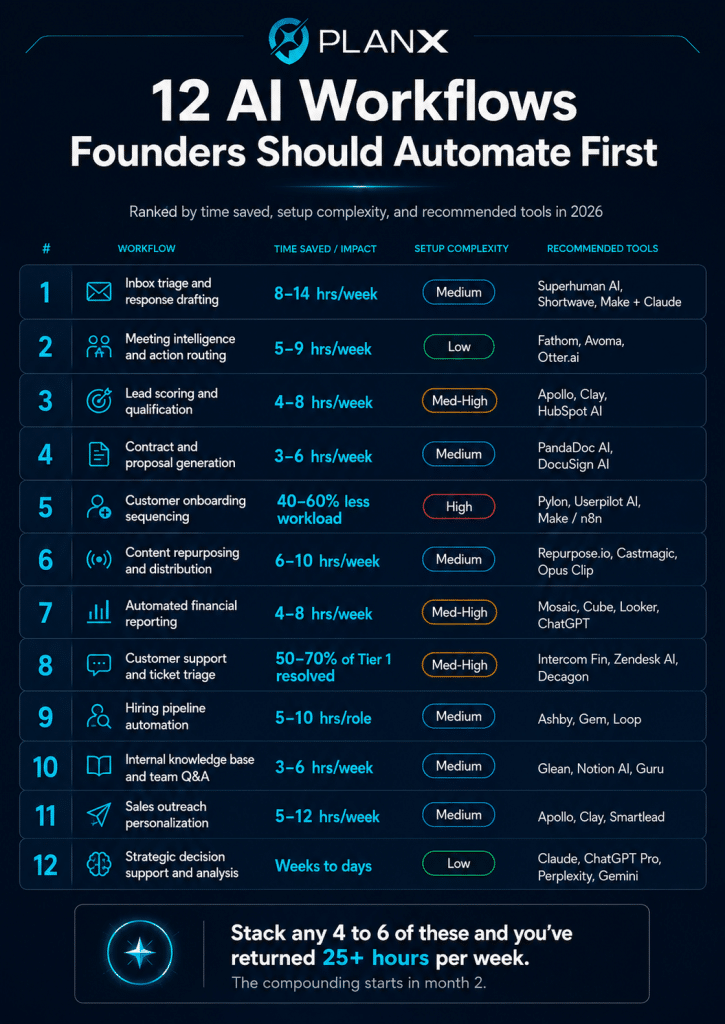 Gartner predicts 40%+ of enterprise applications will embed role-specific AI agents by end of 2026. The founders building these workflows now are setting the pace for the next 24 months.
In what order should founders implement AI workflows?
Deploy AI workflows in four phases over 6 to 12 months. Phase 1 (Weeks 1-4): the two fastest wins, meeting intelligence and inbox triage. Phase 2 (Weeks 5-12): sales and content workflows that impact revenue. Phase 3 (Months 3-6): operational foundations like onboarding and support. Phase 4 (Months 6-12): advanced workflows like financial reporting and strategic decision support. Do not deploy all 12 at once. Depth beats breadth.
Phase 1 (Weeks 1-4): The two fastest wins
Start with: AI meeting intelligence (Workflow #2) and AI inbox triage (Workflow #1).
Why first: lowest setup complexity, highest immediate time savings, requires no team buy-in to deploy. You’ll return 13 to 23 hours per week within 30 days. The momentum from this win is what funds the more complex workflows that follow.
Phase 2 (Weeks 5-12): Sales and content layers
Add: AI lead scoring and qualification (Workflow #3), AI content repurposing (Workflow #6), AI outreach personalization (Workflow #11).
Why second: these directly impact revenue, which creates the budget justification for everything that follows. They also have measurable outputs, which means you can prove ROI to skeptical team members.
Phase 3 (Months 3-6): Operational foundations
Add: contract generation (Workflow #4), customer onboarding sequencing (Workflow #5), customer support triage (Workflow #8), hiring pipeline (Workflow #9).
Why third: these require more setup but they reduce team workload significantly. By Phase 3, you’ve earned organizational permission to make bigger changes because the previous phases produced visible wins.
Phase 4 (Months 6-12): Advanced workflows
Add: financial reporting automation (Workflow #7), internal knowledge base (Workflow #10), strategic decision support (Workflow #12).
Why last: highest setup complexity, biggest organizational change required, but also highest long-term leverage. By month 6, you’ve earned the right to do the big rebuilds because everything else is already paying back.
| What you should have at Month 6
If you’ve worked through Phases 1 to 3 properly: 8 AI workflows running consistently, 25 to 40 hours of founder time recovered per week, sales pipeline conversion improved 15 to 30%, customer onboarding time reduced 40 to 60%, content reach multiplied 5 to 8x. The exact numbers vary by business but the magnitude is consistent across the PlanX community. |
Why do AI workflow projects fail?
AI workflow projects fail for five main reasons: starting with tools instead of bottlenecks, fully automating without human checkpoints, not measuring actual time saved, skipping team training, and ignoring data infrastructure. Each is preventable with the right approach.
1. Starting with tools, not bottlenecks
Most founders pick a tool first (“we should use Zapier”) and then look for problems to apply it to. This produces tool sprawl and minimal ROI. The pattern that works: identify the specific bottleneck first (“customer onboarding takes too long”), then pick the tool that solves that bottleneck.
2. Fully automating without human checkpoints
AI handles 80% of tasks 99% of the way. It catastrophically fails on the last 20% or the last 1%. Founders who fully automate customer-facing outputs, contracts, payment processes, or high-stakes communications get burned within 6 months. Keep a human in the loop on anything where being wrong has real cost.
3. No measurement of actual time saved
Most founders deploy AI workflows and never measure whether they actually saved time. Without measurement, you can’t optimize, you can’t justify expanding the program, and you can’t tell which tools are actually pulling weight. Track hours saved per week per workflow. Honestly. This is the difference between proving the program and assuming it.
4. Skipping team training
Per recent research, 70% of employers provide zero AI training to their teams. Then they wonder why the team isn’t using the tools. Budget 4 to 8 hours per quarter per team member on AI skill building. Make it part of weekly operations, not a one-time onboarding.
5. Ignoring data infrastructure
AI cannot generate value from messy data. If your customer records are in three different systems and your sales data is in spreadsheets, AI workflows will produce inconsistent results. Spend the unglamorous time consolidating data infrastructure before scaling AI workflows. This is the gap that 67% of businesses have not closed in 2026.
| Diagnose before you deploy
The 2-minute Founder Bottleneck Quiz tells you which of the 12 workflows will pay back fastest in your specific business. Built for founders past their first $1M. Free. |
Frequently Asked Questions
Which AI workflow should I automate first as a founder?
Start with AI meeting intelligence (Workflow #2) and AI inbox triage (Workflow #1). These have the lowest setup complexity, highest immediate time savings, and don’t require team buy-in to deploy. You’ll return 13 to 23 hours per week within 30 days. The momentum from this win funds the more complex workflows that follow.
What’s the difference between AI automation and traditional workflow automation?
Traditional automation (Zapier, IFTTT, Make.com without AI) follows fixed rules. When inputs change, rules need updates. AI workflow automation uses agents that adapt to context, make decisions, and adjust actions dynamically. Traditional automation is a sequence of “if this, then that” steps. AI workflows are “here’s the goal, figure out how to accomplish it.”
What are the best AI workflow automation tools in 2026?
For visual workflow building: Make.com (managed) or n8n (open-source/self-hosted). For cross-app automation with AI: Zapier Central or Zapier Agents. For founder-friendly simplicity: Relay.app. For multi-agent systems: Relevance AI or Gumloop. As the underlying LLM doing the reasoning: Claude (best for analysis), ChatGPT, or Gemini. Most successful founder deployments use 3 to 5 tools total.
Should I use ChatGPT or Claude for AI workflows?
Both work. Claude tends to be stronger for analytical reasoning, longer-context analysis, and coding tasks. ChatGPT has broader ecosystem integration and faster shipping of new features. Gemini Deep Research is strong for research-heavy workflows. Most founders running serious workflows use 2 or 3 of these depending on the task type. Don’t pick one and ignore the others.
How much do AI workflows cost to set up and run?
Tool costs typically run $200 to $2,500 per month for founders at $1M to $5M ARR. Setup costs vary: DIY with founder time is free but slow. Hiring an AI implementation consultant for 1 to 3 priority workflows runs $5,000 to $25,000 depending on complexity. The ROI question is what matters, not the cost: well-implemented workflows return 15+ hours of founder time per week, which at any reasonable founder hourly rate is $10,000+ per month in value.
Will AI workflows replace my team?
No. AI workflows replace specific tasks that team members were doing. The teams who win in 2026 are the ones where AI handles the high-volume routine work and humans handle the judgment, relationships, and creative work that compounds value. The founders cutting headcount while deploying AI are typically getting it wrong. The ones making existing team members 3x more effective are getting it right.
Is AI workflow automation worth it for a small business under $1M ARR?
Selective yes. Workflows #1 (inbox triage), #2 (meeting intelligence), and #12 (strategic decision support) produce strong ROI at any business size. The other 9 workflows have setup complexity that doesn’t justify the ROI below $1M ARR. Wait until you cross that threshold before investing in the more complex deployments.
How do I know if I’m being sold real AI agents or agent washing?
Three tests. (1) Ask for a live demo of the agent making a decision and self-correcting when something fails. Real agents do this; wrappers don’t. (2) Ask for a list of tools/APIs the agent can call (real agents have specific tool catalogs). (3) Ask for customer case studies showing the agent running unsupervised for at least 30 days. If a vendor can’t produce all three, it’s likely agent washing.
Can I build AI workflows myself or do I need an engineer?
Most workflows in this list can be built without an engineer using tools like Make.com, Relay.app, or Zapier. The exceptions are: custom multi-agent systems (need someone technical), deep integration with proprietary databases (need engineering), and complex sales/finance workflows with sensitive data (need someone who understands security). Founders building their own workflows learn faster but ship slower. Founders hiring an implementation consultant ship faster but learn less. Both work.
What’s the ROI of AI workflow automation for a 7-figure business?
Properly implemented across 4 to 6 workflows, the typical return for a 7-figure business is: 15 to 25 hours of founder time recovered per week, 15 to 30% improvement in sales pipeline conversion, 40 to 60% reduction in customer onboarding time, 30 to 50% reduction in customer support headcount needed, and 5 to 8x multiplication of content distribution reach. Translate any of those into your business and the dollar value is typically 10x to 50x the tool and implementation cost.
How long does it take to see ROI from AI workflows?
First two workflows (meeting intelligence + inbox triage): 30 days to clear ROI. Sales workflows (lead scoring + outreach): 60 to 90 days to clear ROI. Operational workflows (onboarding + support): 90 to 180 days to clear ROI. Strategic decision support: hard to measure directly, but typically pays back within 6 months through better major decisions. If a workflow hasn’t returned clear ROI within these timeframes, you have the wrong tool, wrong implementation, or wrong diagnosis.
When should I attend an AI conference vs just building workflows?
Reading content like this teaches you frameworks. Conferences compress 6 to 12 months of vendor evaluation, peer learning, and implementation troubleshooting into 2 days. The math: a 1-hour conversation with a founder who solved your exact workflow problem 6 months ago is worth more than 50 hours of independent research. PlanX 2026 specifically pairs 7-figure founders with the AI implementation specialists, agent platform vendors, and operators who have already deployed what you’re trying to build.
Where AI workflow conversations actually happen in 2026
Reading guides like this teaches you the patterns. Building real AI workflow infrastructure requires conversations with founders who’ve already done it, vendors who can demo their tools live, and implementation specialists who can troubleshoot your specific blockers.
PlanX 2026 is the 2-day founder conference in Dubai built specifically for operators scaling past 7 figures, with a dedicated Leverage track focused on AI workflows, agentic automation, and operational systems. November 25 to 26 at Grand Hyatt Dubai. 2,500 founders. 40+ speakers. Three tracks: Growth, Leverage, Network.
The Leverage track is where the AI workflow conversations actually happen. Founders sharing the specific workflows they’ve deployed, what tools they’re using, what’s working and what isn’t, what 2026 changed about the agent landscape. Not panels about “AI’s transformational future.” Tactical, current, what’s actually shipped and shipping.
| Lock in PlanX 2026 tickets
Super Early Bird Global Access at $299 (50% off, available May to June). Limited Offer with 2 nights at Grand Hyatt at $698 (only 150 units total). Sovereign VIP with private yacht after-party at $599 Super Early Bird. |
Going deeper: the complete AI scaling library
This guide is part of the broader PlanX AI scaling library. Each piece connects to the next:
- Start here for the strategic framework: Scaling with AI: The 2026 Playbook for 7-Figure Founders (the pillar guide).
The bottom line on AI workflows in 2026
The opportunity is specific and measurable. 12 workflow patterns, each returning real founder time and producing measurable revenue impact when deployed properly. The founders working through this list systematically over the next 90 to 180 days will return 25 to 40 hours per week of their own time, improve their sales metrics 15 to 30%, and compound team effectiveness 3 to 5x.
The catch is that AI workflows reward depth, not breadth. 4 to 6 workflows deployed well beat 12 workflows deployed shallow. The founders who win are the ones who diagnose first, deploy systematically, measure honestly, and avoid agent washing.
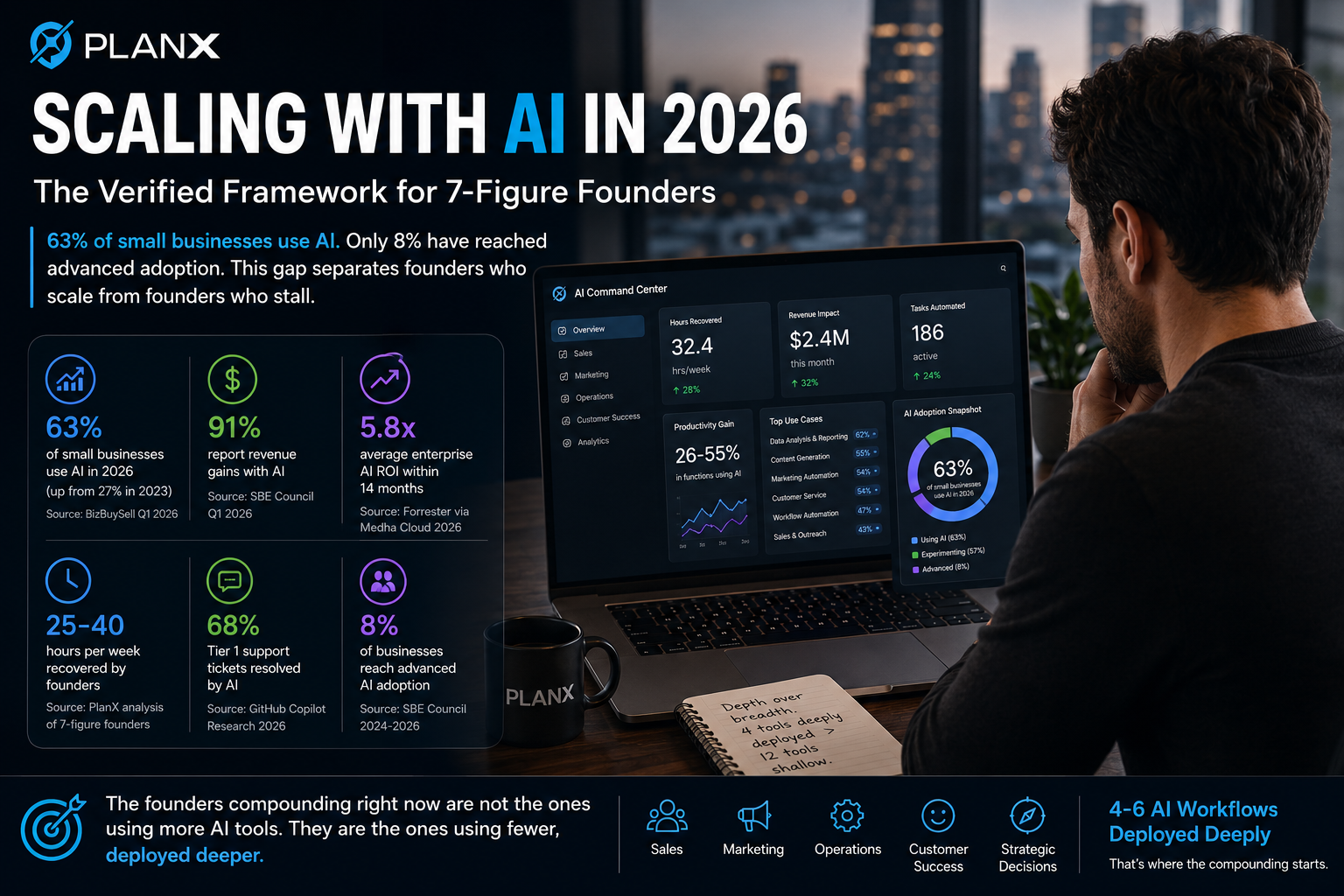
If you’re serious about this, the work is straightforward. Take the Bottleneck Quiz to find your starting point. Pick the 2 workflows from Phase 1 that match your bottleneck. Deploy them in the next 30 days. Measure the time saved. Then move to Phase 2. By month 6, you’ll be in the 8% of businesses with advanced AI adoption rather than the 92% still experimenting.
The math has changed. The tools have consolidated. The competitive divide is widening every quarter. What you do with that is up to you.
| Start with the diagnosis
The 2-minute Founder Bottleneck Quiz tells you which of the 12 workflows will pay back fastest in your specific situation. Built for founders past their first $1M. Free. |